SUPPORTED HARDWARE
Xiaomi Bluetooth Remote 2 / 2 ProChromecast Voice Remote (G9N9N)Google TV Streamer Voice Remote (GY3LE)Apple Siri Remote
 Voice Input BuddyVoice within reach
HARDWARE × VOICE INPUT
Pick up your remote. Press to talk. Release to finish.
Bring its microphone to your favorite input tool.
macOS 14+ · Separate arm64 / Intel installers · Universal uninstaller · Open source
Every idea starts
with a few words.
Hold the microphone button to try the illustration. No recording.
Hold or tap the voice button to match how your input tool starts and stops.
Shortcuts, app actions, and common phrases turn your remote into a useful companion.
Connect to input methods and dictation tools for the recognition experience you already know.
HOW IT WORKS
Microphone audio + buttons
Decode audio · Trigger shortcuts
Recognize speech · Enter text
Your remote sends audio over Bluetooth. Voice Input Buddy decodes it, routes it into a virtual microphone, and triggers the voice shortcut. Recognition, live text, and corrections come from the input tool; Buddy does not run a speech-recognition model.
APP INTERFACE
Thoughtfully crafted with native SwiftUI. Easily manage connected devices, map physical button actions, edit custom phrases, and configure voice tool integrations.
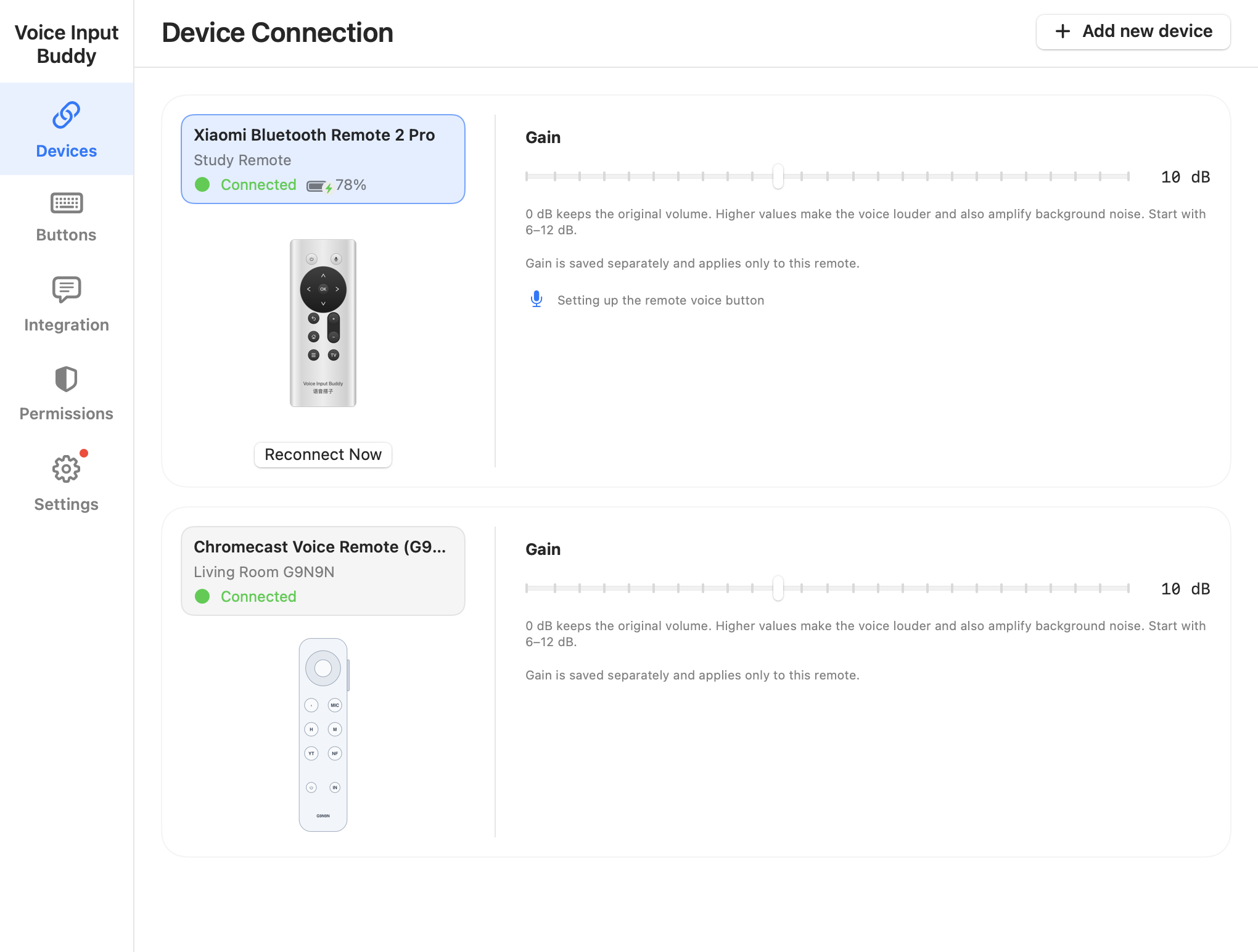
Manage connected Bluetooth remotes (Xiaomi, Google G9N9N), check live battery percentages and charging states, and adjust individual microphone gain (0 dB to 20 dB).
WATCH IT IN ACTION
A two-minute cartoon walkthrough of permissions, remote connection, button mapping, and voice input with WeType.
2 min · Mandarin audio · Chinese captions
GET STARTED
The app and microphone driver install together.
No need for two separate downloads.
Download the PKG from Releases and open Voice Input Buddy in Applications.
Follow the guide for Bluetooth, Input Monitoring, and Accessibility permissions.
Connect your remote, test its buttons, and wait for the driver check. The app automatically uses Voice Input Buddy Mic; select that microphone in your input tool and configure its voice shortcut.
Test with the guide, then hold the voice button to talk and release to finish. Adjust the trigger for tools that use start/stop taps.
COMPATIBILITY
Choose a tool and configure the virtual microphone and voice shortcut. VoiceCursor has its own entry, using the same custom-shortcut setup as other tools.
Your tool must support the selected microphone and a voice shortcut. Verify your version with the guide; a setup entry does not mean all versions have been tested.
TROUBLESHOOTING
A remapper can take exclusive access to the remote, preventing Buddy from receiving its buttons. The TV button may stop switching apps and the back button may stop deleting text, even while Bluetooth or voice input still works.
If Buddy still reports that another input tool owns the device, restart Karabiner-Elements and try again. Also check Buddy’s Input Monitoring and Accessibility permissions.
Karabiner’s official device settings guide ↗LOCAL BRIDGE. CLEAR BOUNDARIES.
Buddy does not collect usage statistics or upload logs. Check your input tool’s settings for its own network and recognition behavior.
Driver installation requires administrator authorization and briefly restarts audio. The current PKG is not Apple-notarized and may be blocked by macOS.